

Indicement MT4 Free Download
The EA uses a very well thought out algorithm to find the best entry price and runs multiple strategies internally to spread the risk of the trades.
Welcome to Indicement!
PROP FIRM READY! -> download set files here
LAUNCH PROMO:
- Only a few copies left at current price!
- Final price: 990$
- NEW: Choose 1 EA for FREE! (limited to 2 trading account numbers)
Ultimate Combo Deal -> click here
JOIN PUBLIC GROUP: Click here
INDICEMENT brings my 15 years of experience in creating professional trading algorithms to the Index markets.
The EA uses a very well thought out algorithm to find the best entry price and runs multiple strategies internally to spread the risk of the trades.
All trades have a stoploss and take profit, but also use a trailing stoploss and trailing take profit to minimize the risk, and maximize the potential of each trade.
The system is build on the very popular and proven strategy: trading breakouts of important support and resistance levels.
I’m happy to say that I have perfected this strategy over my many years of developing EA’s
This EA is developed to trade specifically for US500, US30 and NAS100 indices.
These markets are particularly well suited for trading this type of strategy.
Backtests show a very stable growth curve, with very controlled drawdowns and fast recoveries.
This EA has been stress tested for all 3 indices, using multiple pricefeeds for various brokers. Also cross-market testing has been done to exterminate the risk of over-optimizations.
No “neural network/machine learning AI/ChatGPT/Quantum computer/perfect straight line backtests” sales-talk, but a real and honest trading system, based on proven methodology for development and live execution.
As a developer, I have +15 years of experience in creating automated trading systems. I know what has the potential to work and what has not.
I create honest systems, with the highest probability of trading like the backtests without cheating.
Key Features:
- Very easy to use: install on only 1 H1 chart, and use one of the set files provided
- No grid/No Martingale/No risky risk management
- Extremely stable longterm when using the full set of strategies
- Easy to use for Prop Firms
- Minimum account balance: 150$ (use setfile “extreme low risk” for accounts smaller than 300$)
Setup for backtesting:
(It’s highly recommended to use MT5 for backtesting, as it will allow to run all indices at the same time to see the real strength of the EA.)
MT4 backtesting:
A) make sure you fill in the CORRECT SYMBOLS for the 3 indices in the parameters (check MarketWatch window to see the actual names for the indices)
B) Select the symbol you want to backtest in the strategy tester
C) Set your desired max drawdown per strategy in the parameters or load a set file here
(check the screenshot here to see it all together)
Setup for live trading:
A) Load the EA to any H1 chart you want (EURUSD recommended as it has the most ticks). EA will automatically run the 3 indices, no matter which chart you run it on
B) IMPORTANT: make sure you fill in the CORRECT SYMBOLS for the 3 indices in the parameters (check MarketWatch window to see the actual names for the indices) (example here)
C) Set your desired max drawdown per strategy in the parameters (or load one of the set files, available here)
IMPORTANT: For AUTO_GMT TO WORK -> you must add the URL “https : // www . worldtimeserver.com/” (remove spaces!!) to the “allowed URL’s” in your MT4/MT5 terminal (tools -> options -> expert advisors)
Parameters:
- ShowInfoPanel -> display the information panel on the chart
- Adjustment for Infopanel size -> in case of 4K display, set value to “2”
- update infopanel during testing -> disabled for faster backtesting
- Friday Stop Hour -> if you don’t want trades to be hold over the weekend, set a value between 0 and 23. (25 means “disabled)
- SetSL_TP_After_Entry -> enable only if your broker doesn’t allow pending orders with SL and TP
- Use Virtual Expiration -> enable only if your broker doesn’t allow pending order with expiration date
- BaseMagicNumber -> the base magicnumber that will be used for all strategies
- Comment for trades -> the comment to be used for the trades
- Remove Comment Suffix -> remove the part that adds more info to the comments (like ‘US500_A’)
- RunUS500 -> enable the strategy for US500 index (SP500)
- US500_Symbol -> set the name of the symbol for the US500 pair (very important to set it correctly!!)
- US500_Strat1 -> enable strategy 1 for this pair
- US500_Strat2 -> enable strategy 2 for this pair
- US500_Strat3 -> enable strategy 3 for this pair
- Value in $ of 1 unit move -> default is “0” (auto). Only change this if you lotsize is much too high. ask me for instructions
- US500_MaxSpread -> max spread allowed
- US500_Randomization -> this will randomize the entries, exits and TrailingSL values a bit, so that multiple users on the same broker, will have a bit different trades. Also good for prop firms.
- Same options for US30 and NAS100 (USTECH)
- EnableNFP_Filter -> turn the NFP filter on or off
- AutoGMT -> let the EA calculate the correct GMT offset for your broker, so that the time of NFP will be correct
- GMT_OFFSET_Winter -> for setting the GMT Offset manually in the wintertime (when AutoGMT is off, or during backtesting!)
- GMT_OFFSET_Summer -> for setting the GMT Offset manually in the summertime (when AutoGMT is off, or during backtesting!)
- NFP_CloseOpenTrades -> force the EA to close all open trades when NFP starts (X minutes before NFP)
- NFP_ClosePendingOrders -> force the EA to delete all pending orders when NFP starts (X minutes before NFP)
- NFP_MinutesBefore -> how many minutes before the NFP event, to close trades and pending orders
- NFP_MinutesAfter -> how many minutes after the NFP event, before the EA resumes trading again
- PROPIRM UNIQUE TRADE SETTINGS -> here you can modify the entry and exits of the trades manually, to make them different compared to other users of the EA (for prop firms)
- Lotsize Calculation Method -> here you determine how the lotsize should be calculated: Fixed lotsize, Max Risk per Strategy, or LotsizeStep
- Startlots -> set the value for fixed lotsize, when that option is chosen. This parameter will be used as “minimum lotsize” when using any of the other 2 options for lotsize calculation
- Max Risk Per Strategy -> The prefered maximum allowed total drawdown (in %) for each strategy. The EA will then determine lotsize based on the historical max DD of that strategy
- LotsizeStep -> set the step value for which the EA should increase lotsize from 0.01 to 0.02lots
- Set Max Daily Drawdown -> Here you can set a maximum allowed daily drawdown (in %). If it is reached, the EA would close all trades and pending orders, and wait for the next day. This is usefull for prop firms
- Use Equity instead of Balance -> use Equity of the account to calculate all lotsize values
- OnlyUp -> this will prevent lotsize to decrease after losses (more aggressive but faster recovery after losses)
- Trading hours -> here you can set the hours between which the EA should trade
Related Products
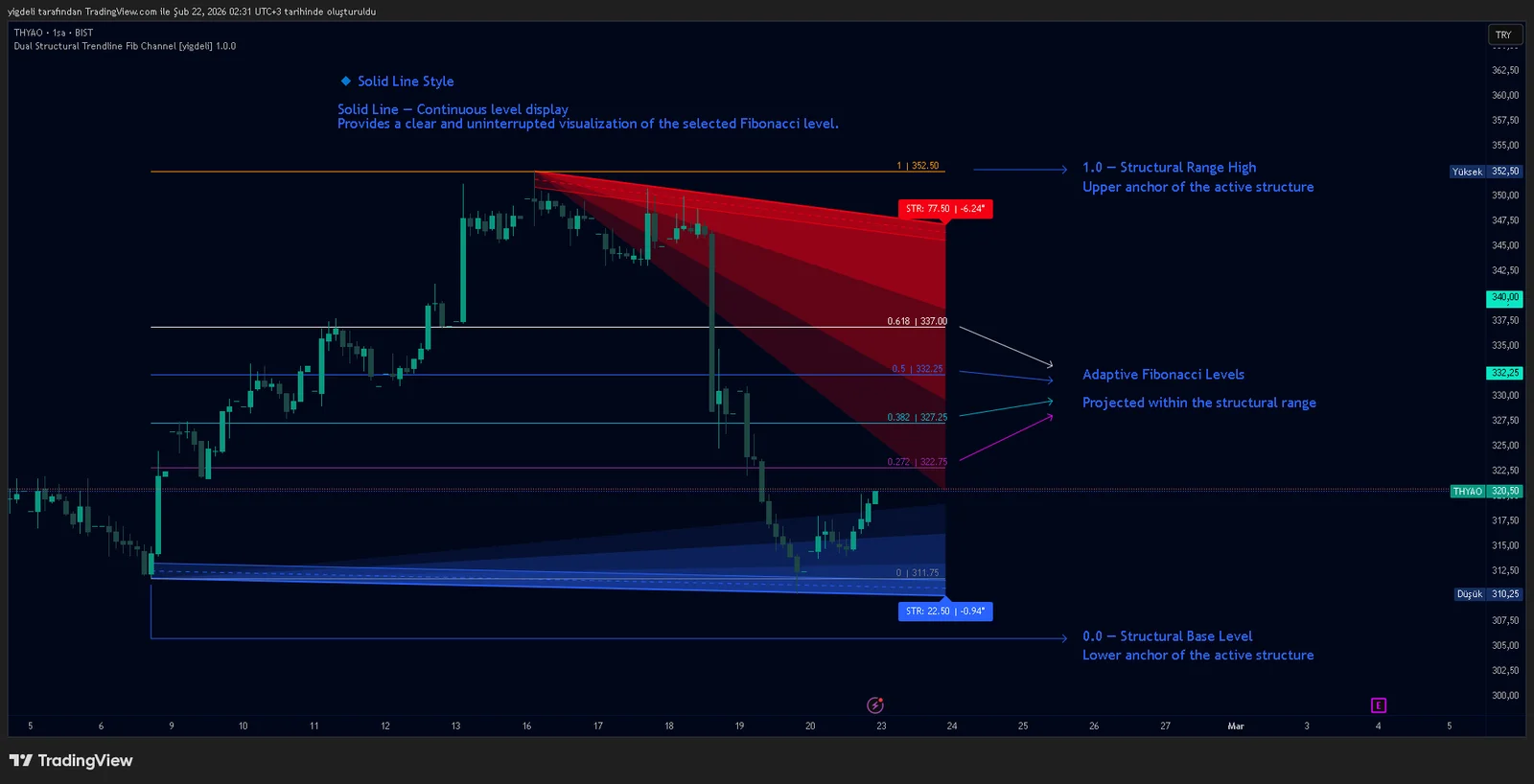
Dual Structural Trendline Fib Channel Free Download
Dual Structural Trendline Fib Channel is a structural analysis indicator that automatically constructs dual trendline channels using pivot-based slope logic.
![Wedge Pattern [InfinityAlgo] Free Download](https://infinityalgoacademy.net/wp-content/uploads/2026/02/Wedge-Pattern-UAlgo-—-Indicator-by-UAlgo-—-TradingView-22-02-2026_21_34-scaled.png)
Wedge Pattern [InfinityAlgo] Free Download
Wedge Pattern is a chart overlay that detects rising and falling wedge formations using strict pivot based rules and a validation engine that enforces classic technical analysis requirements. The script builds two trendlines from confirmed pivot highs and pivot lows

Volatility Aggregation Model Tradingview
Volatility Aggregation Model (VAM) is a very simple overlay indicator that classifies market direction using a five-speed ensemble of volatility-adaptive range engines. Instead of relying on a single trend filter, VAM evaluates direction across multiple responsiveness settings and converts those states into a normalized score

Quantum Emperor MT4 Free Download
Introducing Quantum Emperor EA, the groundbreaking MQL5 expert advisor that's transforming the way you trade the prestigious GBPUSD pair! Developed by a team of experienced traders with trading experience of over 13 years.

CyNera MT4 Free Download
Trading gold, one of the most volatile instruments in the market, demands precision, in-depth analysis, and strong risk management. CyNera Expert Advisor seamlessly integrates these elements into a sophisticated system designed for optimal gold trading.